For couples, wedding planners and venues

Seating plans stop being a nightmare.

A hundred and forty guests, twelve tables, nine dietary requirements and three people who cancel the week before. In WeddingTable you move them by dragging: the room redraws itself and nobody else loses their seat.

To try it we only need your email: no password, no card. The licence is for life, with no subscription.
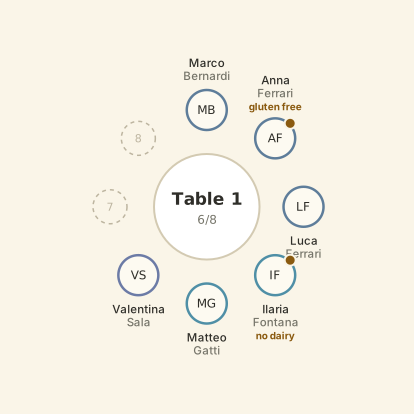
Table 1 — filling up as you watch
Guests
4 to seat3 to seat2 to seat1 to seateveryone seated
Table 1
4/85/86/87/88/8
7
8
1
2
DR
EC
PC
VS
MBMarco Bernardi
AFAnna Ferrari
LFLuca Ferrari
SMSara Moretti
Four guests leave the list and take their seats around the table.
The problem

Everyone does it on a spreadsheet. Everyone redoes it ten times.

We know because it happened to us, a month before our own wedding. The spreadsheet looks nothing like the room, the pencil sketch never updates, and every change costs you half an evening.

The answer

Pick a person up, put them down. That’s it.

The program does the rest. No formulas, no layers, nothing to learn.

Just drag

Take a guest from the list and drop them on a chair. If the seat is taken, the two swap places: nobody is left standing and nobody vanishes.

The room as it really is

Round tables, rectangular ones, a long imperial table, the head table. One or two seats at each end, portrait or landscape. And you move them where they actually stand.

Allergies you can’t miss

Anyone with a dietary requirement carries an orange dot, on the floor plan and in the list. You don’t forget, because it is right there.

Import the spreadsheet you already have

Upload your RSVP file, say which column is the name and which is the allergy, and keep only the people who confirmed. Nobody retypes 140 names.

When someone cancels

Drag them back into the list. Everyone else stays exactly where they are: the plan doesn’t collapse.

Leave with the files you need

A high-resolution floor plan to print, an Excel file for the venue with a sheet of allergies alone, a card for the kitchen wall, and a backup copy to keep.
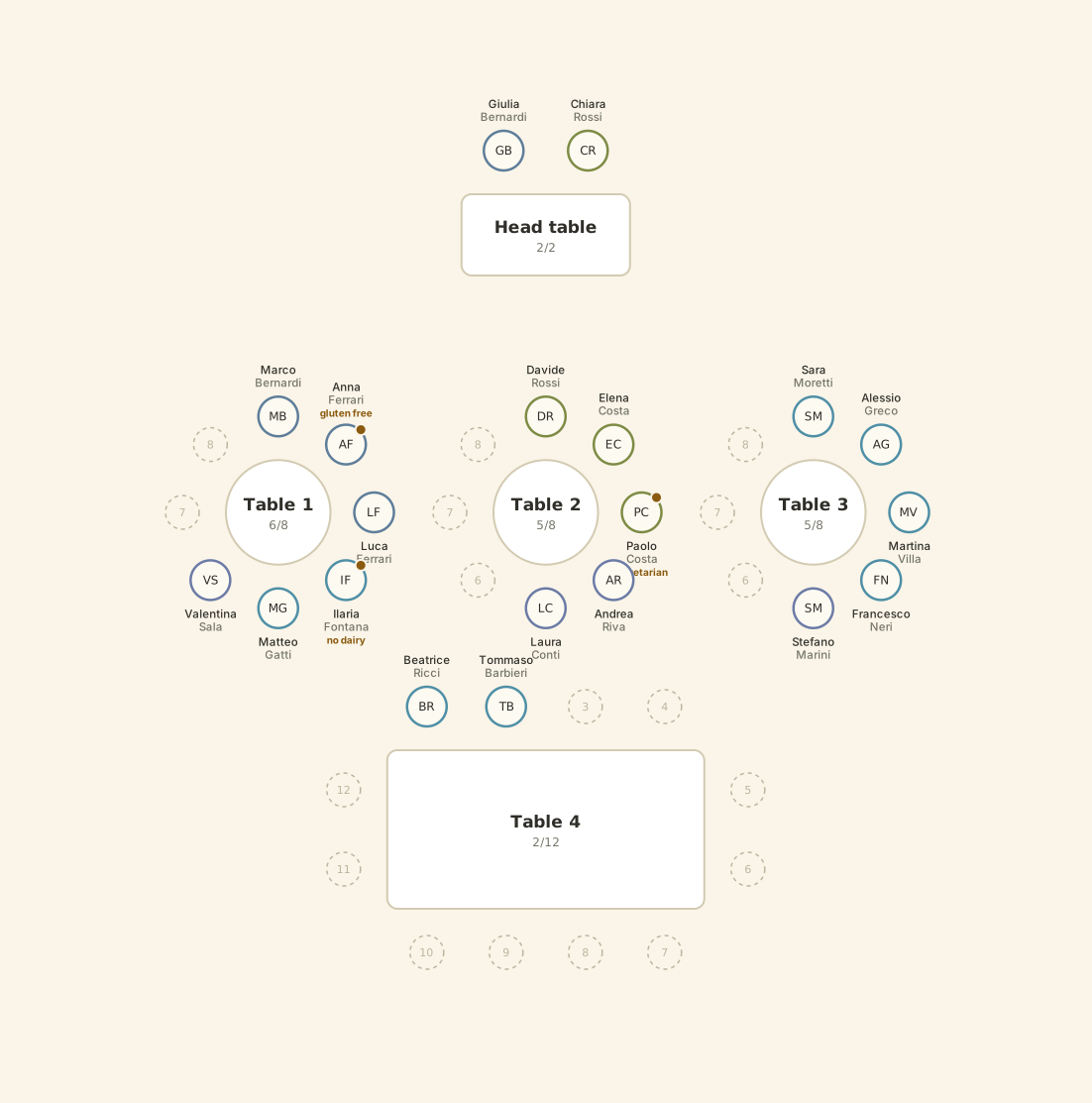
A whole room: the head table at the top, three round tables in a row and a rectangular table with seats at both ends, all with the guests' names.
This floor plan came out of WeddingTable exactly as you see it. Export it at high resolution, print it, hand it to the venue.
Who it’s for

Anyone seating a room, once or a hundred times.

Couples

Once only — but it’s the once that counts

Open it in the evening, sort the tables in an hour, send the floor plan to the venue the next morning. You pay once and it stays yours: no subscription for an event that lasts a day.

Wedding planners

One plan per wedding

Keep every plan separate in the same account, reopen them when the couple changes their mind, and hand over a PDF or an Excel that looks like a studio made it.

Venues and caterers

The kitchen wants allergies, not romance

The Excel export has a sheet dedicated to dietary requirements, table by table. Print it and pin it up: the waiter knows who they are serving and with what.

How it works

Three steps, no manual.

guests.xlsx
1
2
3
floor-plan.png
venue.xlsx
to print

Load the guests

Your spreadsheet, or paste the names one per line. Groups and allergies are recognised on their own.

Lay out the room

Add tables with the shape and seat count you need, drag them where they actually stand, and name them however you like.

Drag, then hand it over

Seat everyone, then export: floor plan, Excel for the venue, a sheet to print. Done.

Price

Pay once. It stays yours.

A wedding takes three months to plan, not three years. Paying a monthly fee for something you use for one season makes no sense.

€49

once · lifetime licence

  • Unlimited guests and tables
  • Up to 20 separate plans in one account
  • Every shape: round, rectangular, imperial, head table
  • Import from Excel and CSV, filtered by RSVP
  • Export floor plan, Excel, printable sheet, backup copy
  • English and Italian
  • Future updates included
  • No subscription
  • No yearly renewal
  • No card needed to try it
Buy the licence

Or try it first: give us your email, we send a link, you are in.

Questions

What people ask us.

Do I need to install anything?
No. It opens in the browser, on a computer or a tablet. Nothing to download, nothing to update.
How does the trial work?
You leave your email and a link arrives: click it and you are in, with no password to invent. You find a sample wedding already laid out, and you can move the guests around as much as you like to see how it works. To put your own guests in — the real names, your spreadsheet, the allergies — you need the licence.
Where do my guests’ details go?
Into your account, and nowhere else. We don’t sell data and we don’t show it to anyone. You can export everything whenever you want, and delete the account when you are done.
Do I need to be online while I work?
Only to save to your account. If the connection drops, your work isn’t lost: it stays on the computer and is saved again as soon as you are back online.
Can I use it for more than one wedding?
Yes. The licence covers up to 20 separate plans in one account: if you are a planner or a venue, keep one plan per event.
Is it only for weddings?
No. A company dinner, a graduation, a big birthday, a restaurant’s evening service: if there are tables and people to seat, it fits.
How many seats can one table have?
Up to 60. The imperial table at our own wedding had 46, with seats at both ends — it was built for exactly that.
WeddingTable

We built it for our own wedding.

A hundred and forty guests, twelve tables, an imperial table of forty-six. After the third evening spent deleting and retyping we gave up and wrote this instead. It worked — so it may as well work for you.

Sara and Pellegrino